Project Overview
Costco's food court pizza is one of its most beloved offerings, a $10 whole pizza that rivals restaurant quality has made it a go-to for families, parties, and events. Yet despite this popularity, the ordering experience is stuck in 1998: the only way to place an advance order is to call the food court directly.
Costco has a high-demand, high-volume food product with zero digital ordering infrastructure. Phone-only ordering creates friction at every stage — before, during, and after the transaction, and the in-warehouse pickup experience compounds the confusion with no guidance whatsoever.
My Role
I led this project end-to-end as UX Researcher and Product Designer. The research is grounded in a genuine firsthand experience, and the proposed solutions are production-ready in scope.
The Opportunity
Why Costco Pizza?
Costco sells more pizza than most national chains. At $9.95 for an 18" pie, it's become a cultural staple with a near-cult following. But the ordering experience hasn't kept up. No app. No web form. No kiosk. Just a phone number and the hope that someone picks up during food court hours.
Pizza is a high-volume, high-demand item with a proven value proposition. Without a digital ordering channel, Costco can only capture orders from customers willing to call during food court hours, and as the Reddit community has documented, those calls frequently go unanswered. Every unanswered phone call is a lost order.
Research & Discovery
Primary Research: Firsthand Experience
The research for this project started with placing a real order. I called my local Costco food court to order 10 pizzas for a family birthday party. What followed was a friction-filled experience that surfaced problems I hadn't anticipated, and exposed a pickup process I didn't know existed until I was standing confused at the food court counter.
Key observations from placing the order:
Secondary Research: Competitive & Contextual
I reviewed how comparable food service experiences handle pre-ordering to establish a design baseline:
Costco App & Website Audit
I audited both costco.com and the Costco app to understand what digital infrastructure exists and where a food court ordering experience might logically live. What I found wasn't a broken flow, it was a complete absence.
costco.com:
Costco App:
In-Warehouse Kiosk:
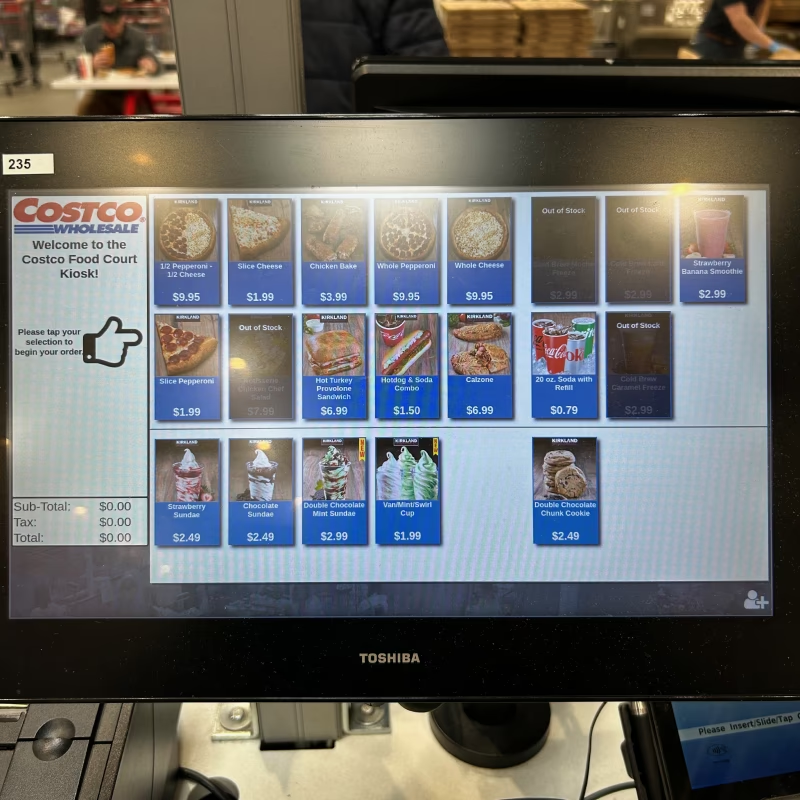
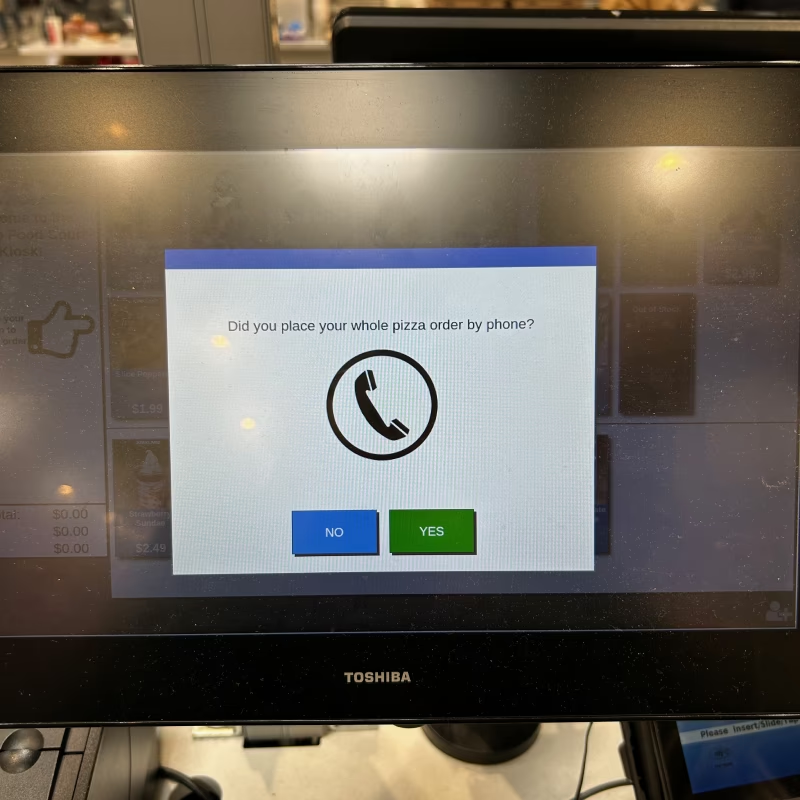
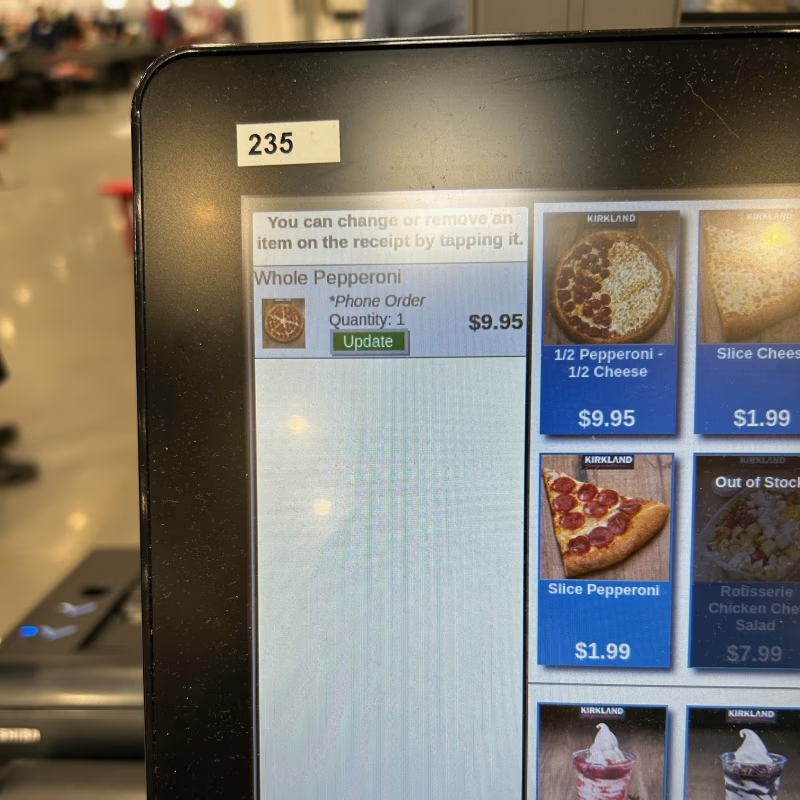
This isn't a case of a broken ordering flow, it's a disconnected one. The kiosk knows you ordered by phone. It asks you about it. It even labels your item '*Phone Order.' But it has no access to what you actually ordered, no name, no quantity, no verification. You still pay at the kiosk as if you walked up. The phone order and the kiosk payment are two completely separate transactions with no data bridge between them.
User Personas
Two distinct Costco members encounter the pizza ordering experience in very different ways. Each persona exposes a different failure mode in the current system, and each one informs a different design requirement in the proposed solution.
Marcus — The Event Organizer
Ordering 10 pizzas for a family birthday party
Married father of two, works in project management. Tech-comfortable but not tech-first, he uses apps when they save him time, not as a default. Plans family events carefully and values reliability over novelty.
- Order 10 pizzas with minimal effort
- Know the total cost upfront to budget the party
- Pick up smoothly without wasting party time
- Get a confirmation so he doesn't have to remember everything
- Had to hunt for his membership card mid-call
- No confirmation sent, has anxiety about whether the order is real
- Arrived at the counter on pickup day only to be told to go use the kiosk first
- 10 pizza boxes, no cart, completely unprepared
End-to-end order confirmation with full pickup instructions at time of order. Large-order logistics support (quantity calculator, cart reminder).
"I just needed to order some pizzas for a party. I didn't expect it to be this complicated."
Jess — The Digital Native
Wants to pre-order a pizza for dinner, expects to do it on her phone
Young professional, lives alone, shops at Costco weekly. Orders everything digitally, food, groceries, ride shares. If there's no app or web option, her first instinct is to assume she's missing something, then frustration when she isn't.
- Pre-order a pizza quickly from the Costco app before leaving work
- Pick up on her way home without waiting in the food court line
- Pay ahead so the transaction is already done
- Opens the Costco app, no food court section, no pizza ordering
- Googles it, finds there's no costco.com food court page, which means no ordering option
- Discovers phone-only ordering, genuinely surprised this exists in 2025
- Calls, no answer. Gives up. Orders Domino's instead.
Digital-first ordering channel in the existing Costco app. Upfront payment option. This user is a lost sale without an app experience.
"I looked everywhere in the app. There's literally no way to order food court pizza online. I ended up just ordering Domino's."
Current-State Journey Map
The full current-state experience mapped across all touchpoints, with pain points called out at each stage:
Design Principles
Zero Surprise Pickup
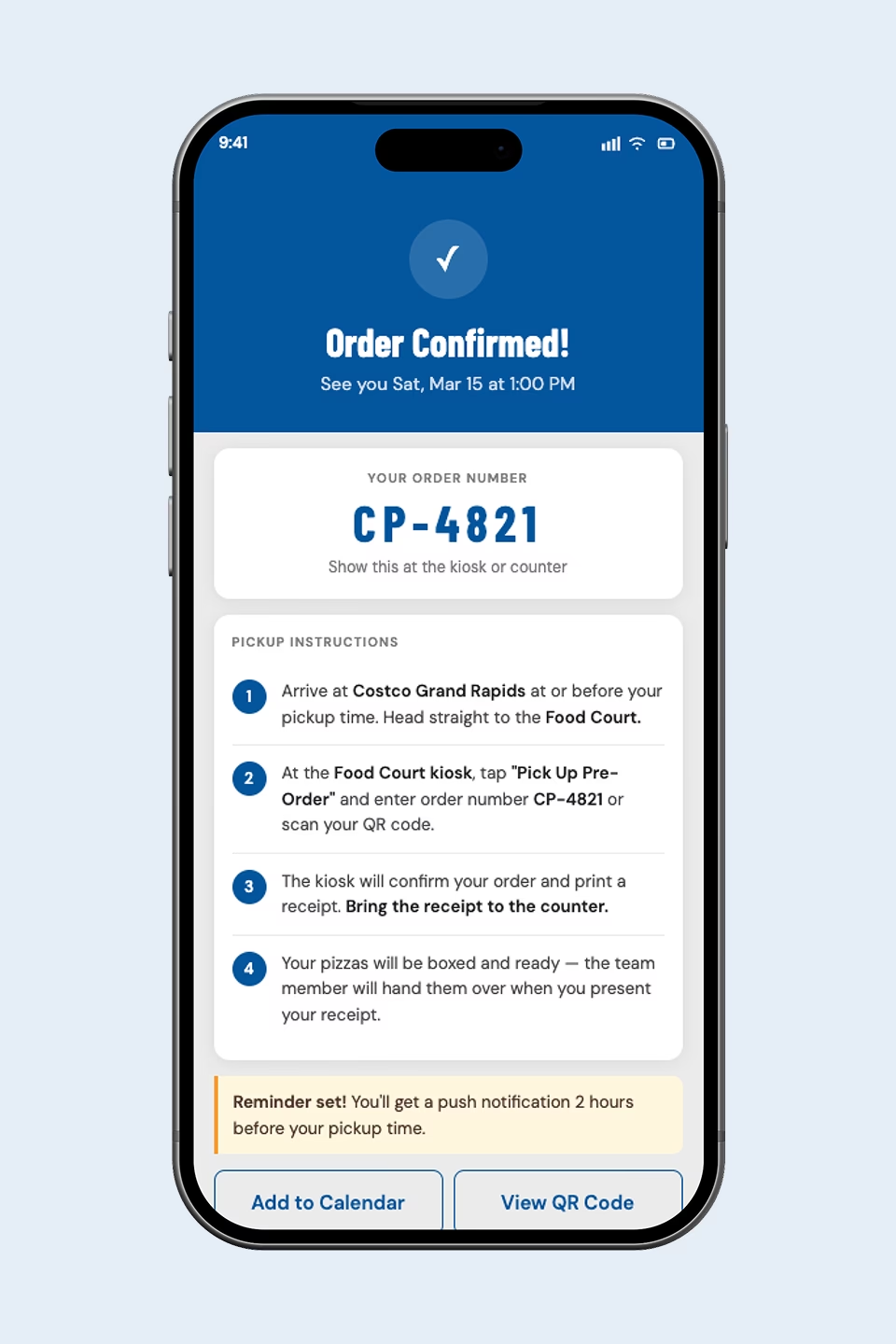
Every step of the pickup process is communicated at the time of order. No new information should surface in-warehouse.
Digital-First, Phone-Optional
The primary ordering channel should be digital. Phone should remain a fully supported accessibility option, not the default.
Deferred Payment by Design
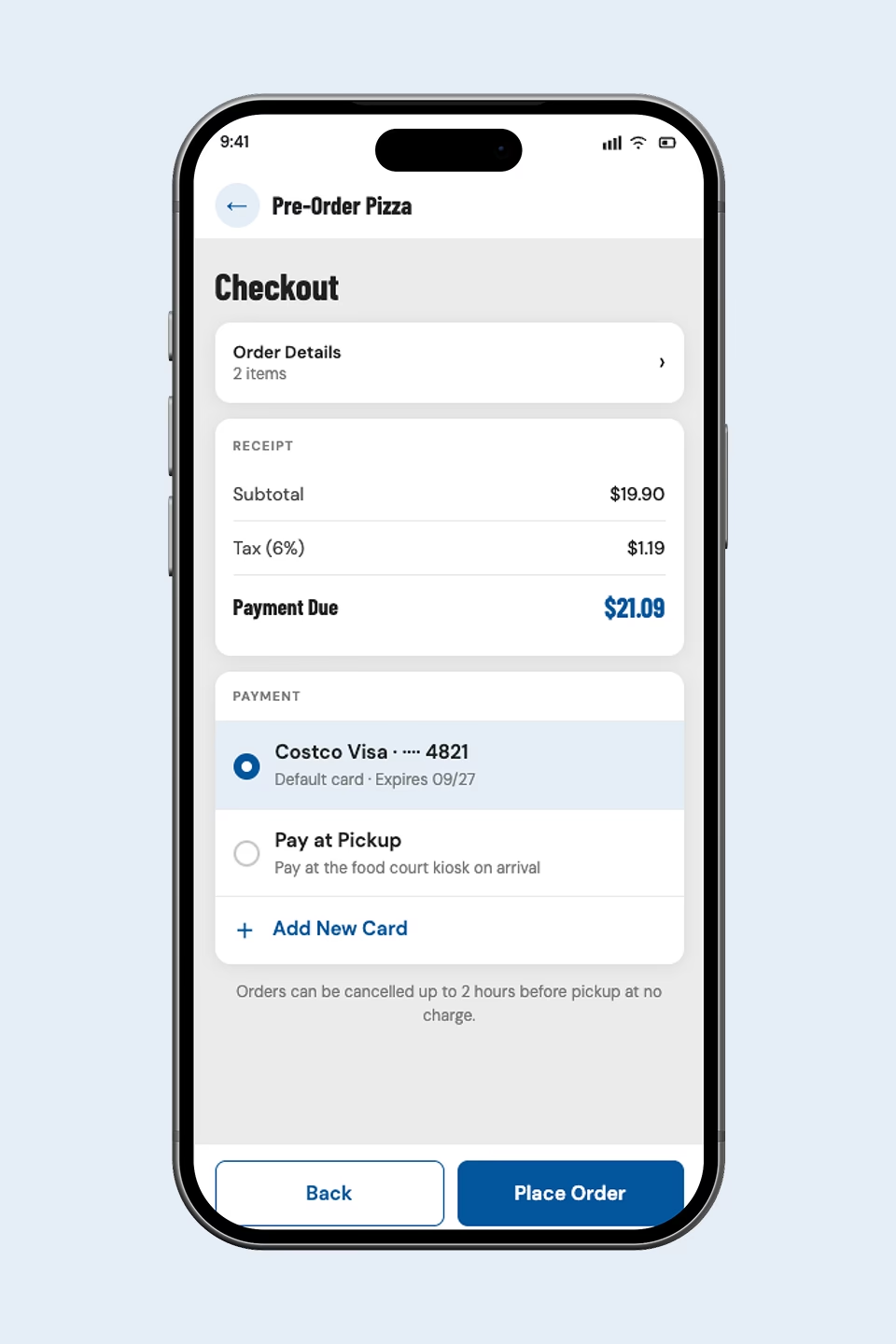
Pay now or pay at pickup. Both options show the full total upfront. Deferred payment is an intentional choice, not an afterthought.
Connected System Thinking
App, web, kiosk, and signage must work as one coherent system. A change in one channel should be reflected in all others.
Proposed Solution: A Connected Ordering System
New Food Court Section
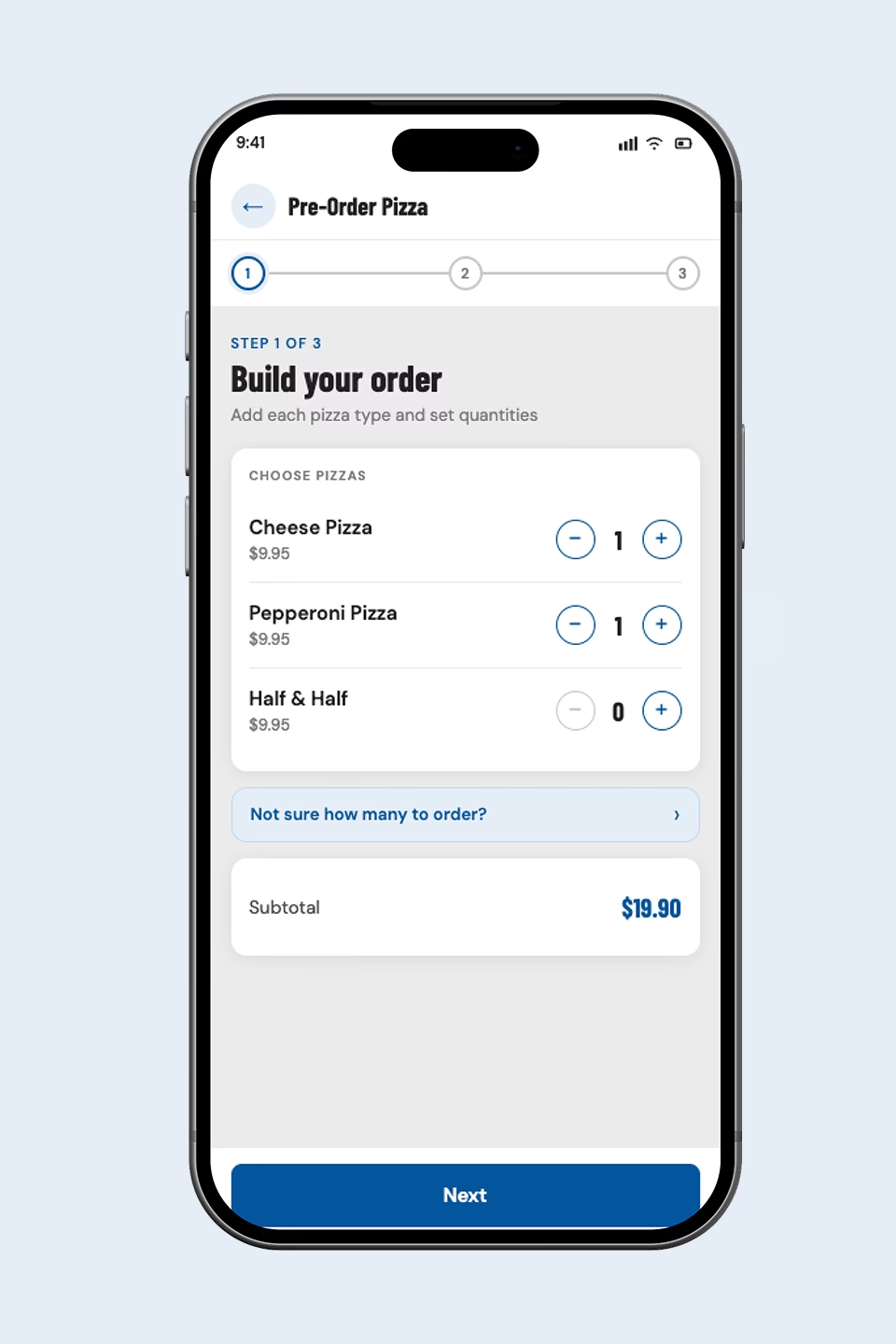
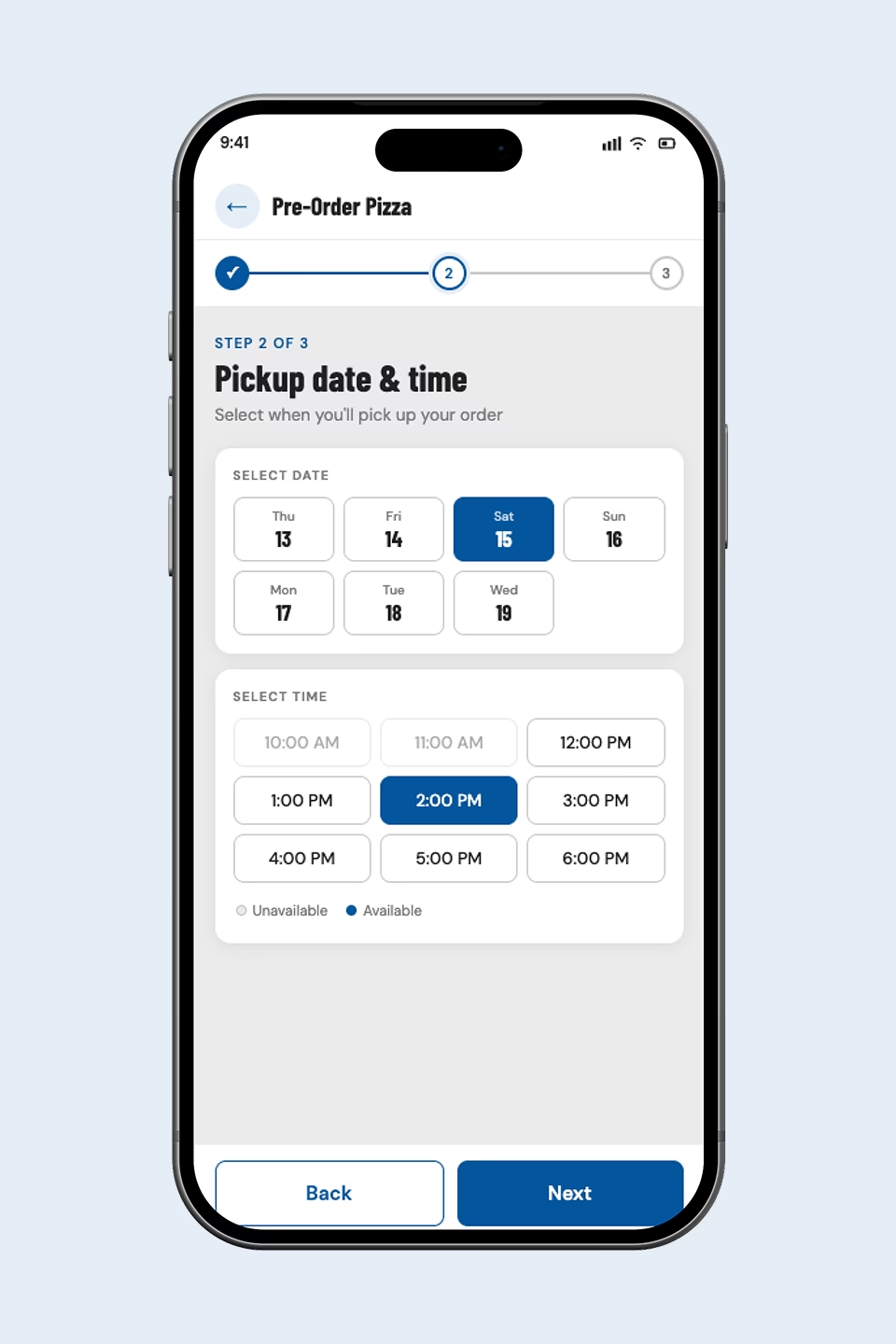
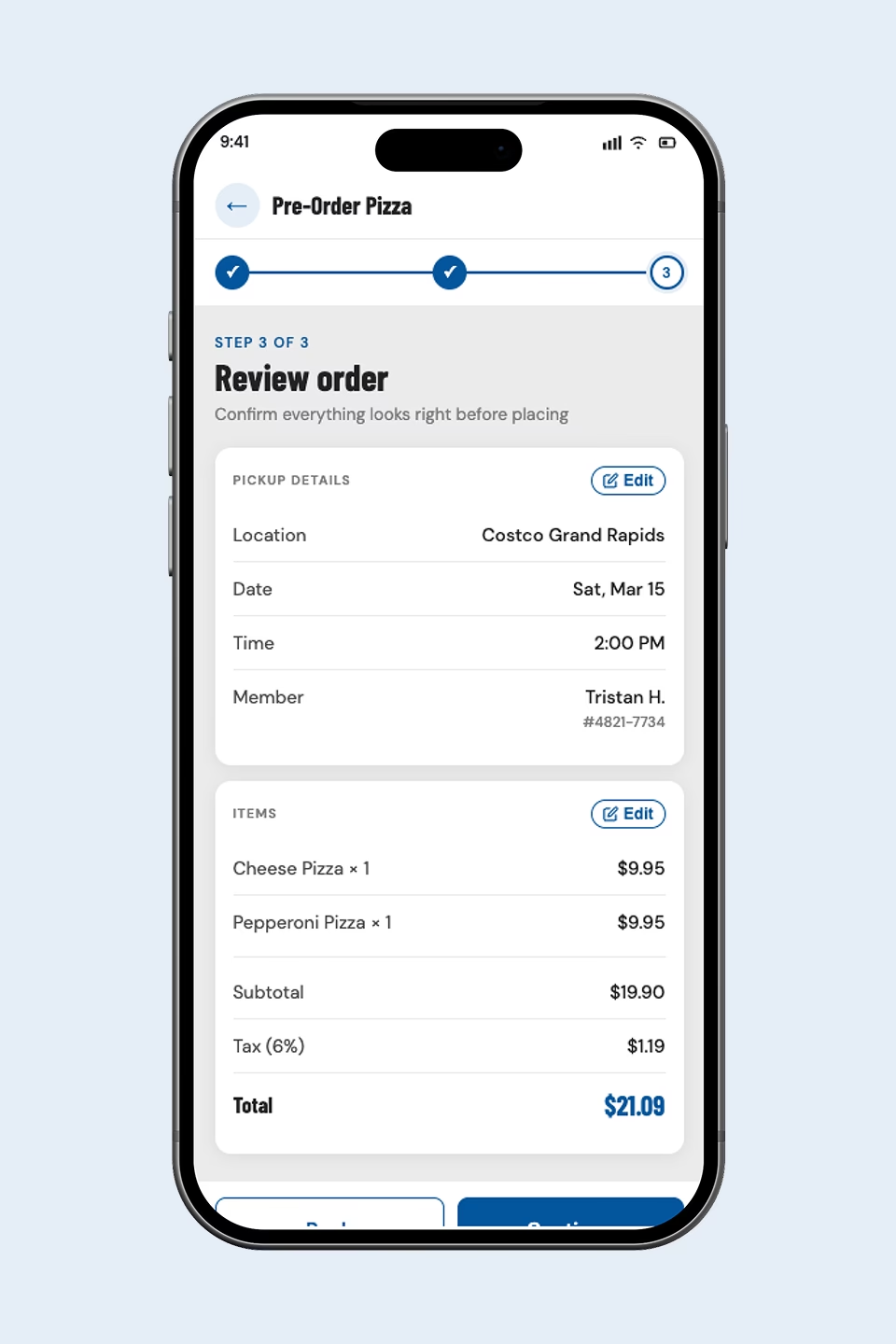
Today the Costco app has no food court presence at all. This concept adds a Food Court section to the main navigation with pizza pre-order as the anchor feature. This is not a fix to a broken flow, it is a net new product surface. Members can build their order, get a quantity suggestion based on headcount, pick a date and time, and choose to pay now or at pickup. A confirmation with step-by-step pickup instructions is sent immediately, with a push reminder two hours before.
New Food Court Page
Costco's website has no Food Court page. This concept adds one. a dedicated section serving two purposes: menu reference for casual browsers and a full pre-order flow for members planning ahead. The order form lives inline on the page, no redirects, with a printable QR code confirmation for kiosk pickup.
Kiosk Redesign
The kiosk gets a dedicated Pre-Order Pickup path on the home screen, separate from walk-up ordering. Members enter their order number or scan their QR code, the system retrieves the order, and payment is collected only if Pay at Pickup was selected.
Physical Wayfinding
Physical wayfinding is the lowest-tech but highest-impact fix. Three signs cover the full path: food court entrance directing pre-order customers to the kiosk, a label above the kiosk identifying the pickup flow, and a sign above the counter confirming what to have ready.
Prototype: Costco App Pre-Order Flow
Explore the full ordering flow, from food court home to order confirmation.
View prototype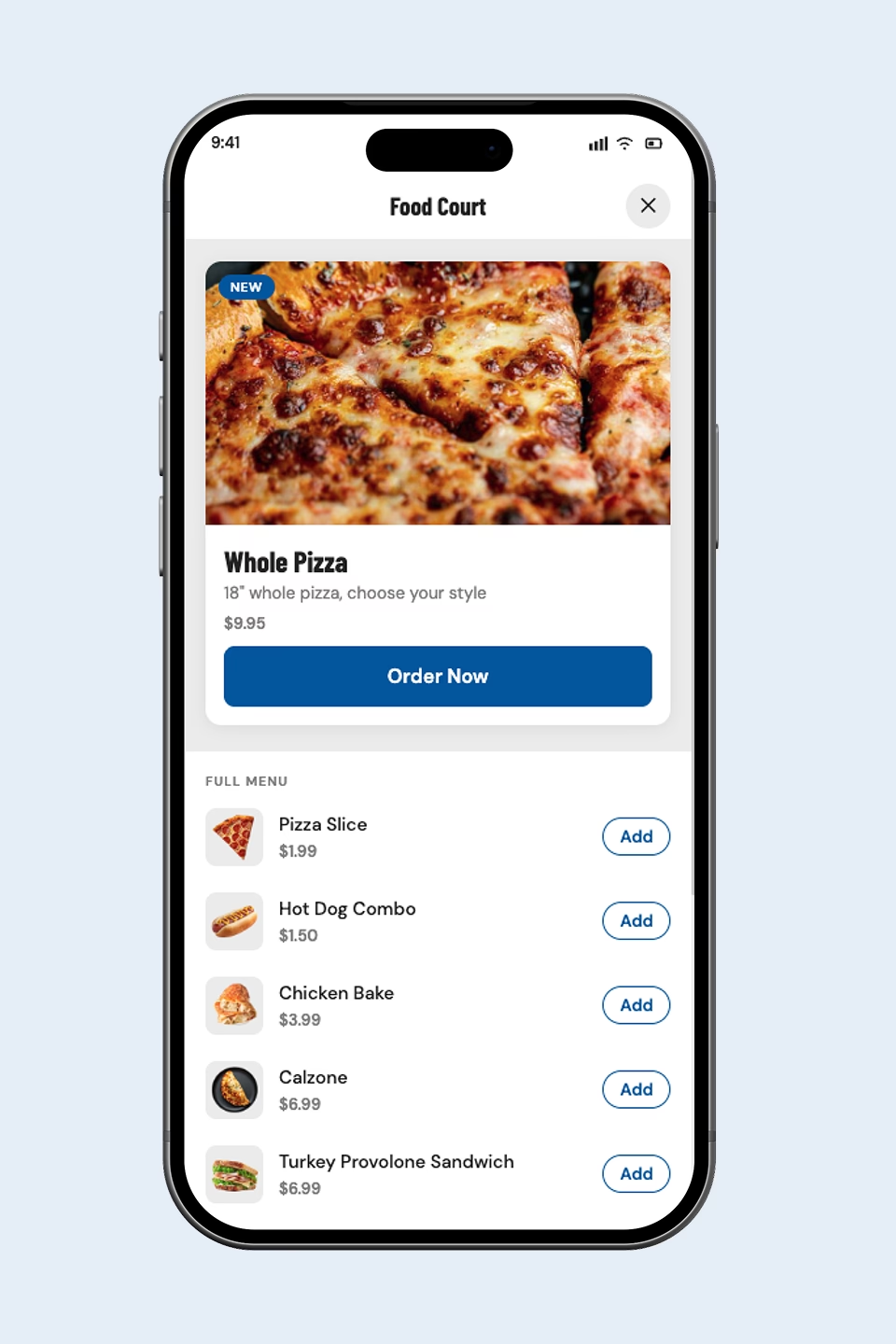
Key Learnings
For orders of 6+ pizzas, a curbside pickup option at the warehouse entrance would be a genuine experience differentiator. A customer pulls up, checks in via the app, and a team member brings the order out. No navigating a packed Saturday food court with 10 boxes. This goes beyond a UX fix into a CX upgrade that Costco's warehouse footprint could actually support. It's the kind of forward-thinking feature that separates a good redesign from a great one.